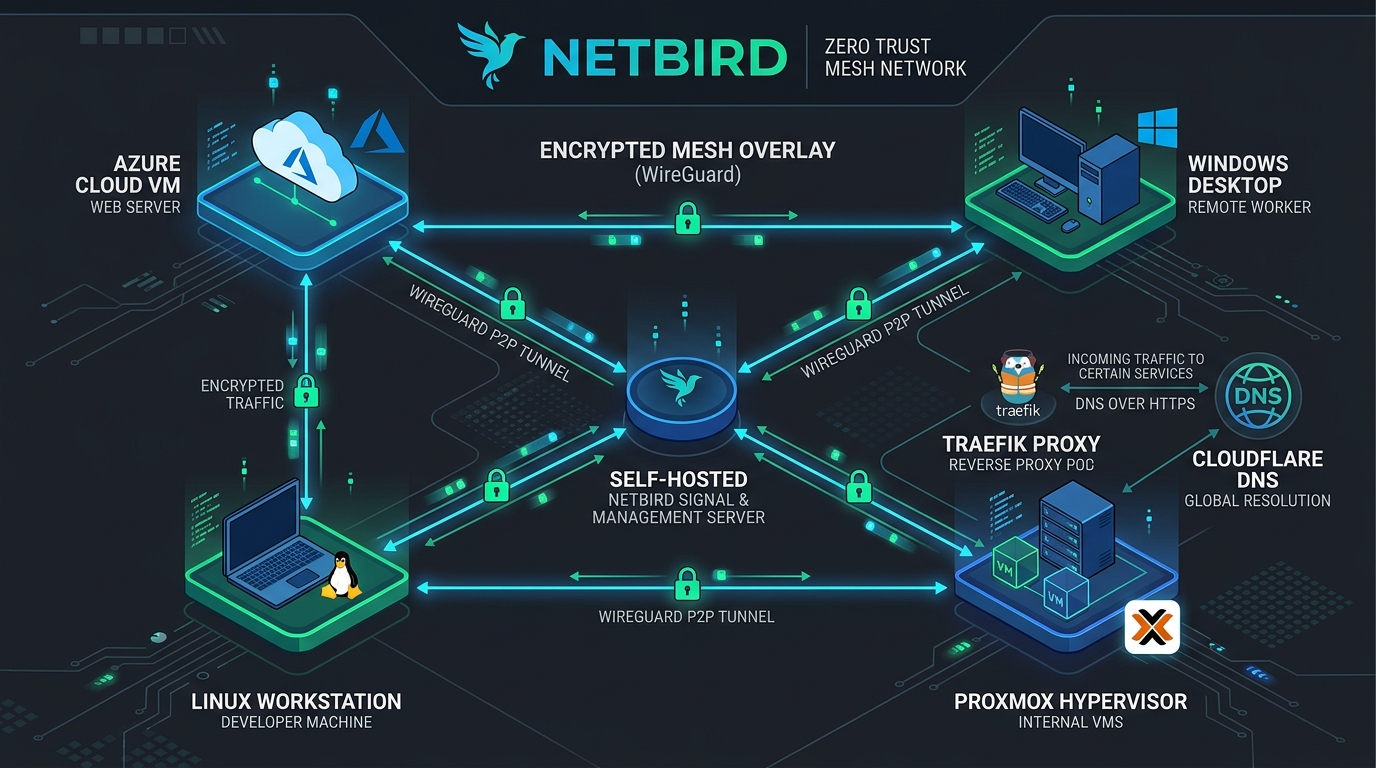
Traditional enterprise VPNs (IPsec, OpenVPN) operate on a centralized hub-and-spoke model: all encrypted traffic is funneled through a central server. This creates a severe bandwidth choke point, single point of failure, and high latency. Furthermore, once an attacker compromises credentials on a legacy VPN, they often gain unrestricted flat network access across the entire subnet.
In this first installment of our Cybersecurity & DevSecOps Cloud Lab Journey, we architect, deploy, and harden a private, self-hosted NetBird Zero-Trust WireGuard Mesh Network hosted on Microsoft Azure.
1. Zero-Trust Mesh Architecture Overview
NetBird builds an encrypted WireGuard mesh where connected peers communicate directly peer-to-peer (P2P) whenever possible. The server acts strictly as the Control Plane (Signaling, Management, Authentication, and STUN NAT traversal), stepping into the data path via WebSockets/UDP Relay only when strict symmetric NAT firewalls prevent direct P2P connections.
                         INTERNET (Clients, Remote Workers)
                                         │
                                         ▼
                      ┌───────────────────────────────────────┐
                      │   Cloudflare DNS (DNS-Only / Grey)    │
                      │        netbird.dynamo2k1.me           │
                      └──────────────────┬────────────────────┘
                                         │
                                         ▼
                 ┌─────────────────────────────────────────────────┐
                 │       Azure VM: Ubuntu 24.04 LTS (Host)         │
                 │   Inbound NSG: TCP 80, 443 | UDP 3478, 51820   │
                 │                                                 │
                 │  ┌───────────────────────────────────────────┐  │
                 │  │       Traefik v3.6 (Reverse Proxy)        │  │
                 │  │   Automatic Let's Encrypt TLS (80/443)    │  │
                 │  └─────────────┬─────────────────────────────┘  │
                 │                │ h2c gRPC / WebSockets / HTTP   │
                 │                ▼                                │
                 │  ┌───────────────────────────────────────────┐  │
                 │  │ netbird-server (Management + Signal +     │  │
                 │  │   Relay + Embedded Dex IdP at /oauth2)    │  │
                 │  │ netbird-dashboard (Next.js Web UI)        │  │
                 │  └───────────────────────────────────────────┘  │
                 └─────────────────────────────────────────────────┘
                                         │
                   Encrypted WireGuard Mesh Overlay (100.x.x.x)
                                         │
           ┌─────────────────────────────┼─────────────────────────────┐
           ▼                             ▼                             ▼
  ┌─────────────────┐           ┌─────────────────┐           ┌─────────────────┐
  │ Pop!_OS Laptop  │ <───────> │  Windows VM RDP │ <───────> │ Proxmox LXC 103 │
  │ Management Host │    P2P    │ VirtualBox Lab  │    P2P    │ Subnet Router   │
  └─────────────────┘           └─────────────────┘           └────────┬────────┘
                                                                       │ (NAT/Masquerade)
                                                                       ▼
                                                              ┌─────────────────┐
                                                              │ Company / Lab   │
                                                              │  192.168.10.0/24│
                                                              └─────────────────┘
2. Cloudflare DNS Configuration: The “Grey Cloud” Requirement
When managing domain names through Cloudflare (e.g. registered on Namecheap and delegated to Cloudflare Nameservers), administrators often enable the default Orange Cloud (Proxied) feature.
Why Cloudflare Proxy Breaks NetBird:
- Raw UDP Dropping: Cloudflare’s HTTP proxy only inspects and terminates TCP HTTP/HTTPS traffic. NetBird relies on UDP 3478 (STUN) for NAT endpoint discovery and UDP 51820 / WireGuard for data tunnels. Cloudflare silently drops raw UDP packets.
- gRPC Stream Termination: NetBird clients maintain long-lived bidirectional gRPC streams for real-time signaling. Cloudflare’s 100-second idle timeouts terminate these connections, resulting in continuous client disconnects (
keepalive ping failed).
The Solution:
Create an A Record pointing netbird.yourdomain.com to the Azure VM public IP, with Proxy status set to DNS only (Grey Cloud):
| Type | Name | Content | Proxy Status | TTL |
|---|---|---|---|---|
A | netbird | <Azure_Public_IP> | DNS only (Grey Cloud) ⚠️ | Auto |
3. Azure Infrastructure & Network Security Group (NSG) Rules
In Azure, create a dedicated Network Security Group associated with the VM’s Network Interface Card (NIC) with strict inbound rules:
| Priority | Rule Name | Port | Protocol | Source | Action | Security Purpose |
|---|---|---|---|---|---|---|
| 300 | SSH | 22 | TCP | Your_Workstation_IP | Allow | Admin CLI management (Least Privilege) |
| 310 | Allow_HTTP | 80 | TCP | Any | Allow | Let’s Encrypt ACME HTTP-01 challenge |
| 320 | Allow_HTTPS_gRPC | 443 | TCP | Any | Allow | Web UI, OAuth2, gRPC Signal & Management |
| 330 | Allow_STUN | 3478 | UDP | Any | Allow | STUN NAT traversal for direct P2P mesh |
| 340 | Allow_NetBird_Relay | 51820 | Any | Any | Allow | Fallback WireGuard Relay |
4. Deploying the NetBird Stack with Traefik & Docker Compose
We configure Traefik as the TLS-terminating reverse proxy. It automatically negotiates and renews Let’s Encrypt certificates and forwards HTTP/2 cleartext (h2c) gRPC requests to netbird-server.
A. Environment Configuration (dashboard.env)
# Endpoints
NETBIRD_MGMT_API_ENDPOINT=https://netbird.dynamo2k1.me
NETBIRD_MGMT_GRPC_API_ENDPOINT=https://netbird.dynamo2k1.me
# Embedded Dex IdP Configuration
AUTH_AUDIENCE=netbird-dashboard
AUTH_CLIENT_ID=netbird-dashboard
AUTH_CLIENT_SECRET=
AUTH_AUTHORITY=https://netbird.dynamo2k1.me/oauth2
USE_AUTH0=false
AUTH_SUPPORTED_SCOPES=openid profile email groups
AUTH_REDIRECT_URI=/nb-auth
AUTH_SILENT_REDIRECT_URI=/nb-silent-auth
NGINX_SSL_PORT=443
LETSENCRYPT_DOMAIN=none
B. Core Server Configuration (config.yaml)
server:
  listenAddress: ":80"
  exposedAddress: "https://netbird.dynamo2k1.me:443"
  stunPorts:
    - 3478
  metricsPort: 9090
  healthcheckAddress: ":9000"
  logLevel: "info"
  logFile: "console"

  authSecret: "<GENERATED_AUTH_SECRET_32_BYTES>"
  dataDir: "/var/lib/netbird"

  auth:
    issuer: "https://netbird.dynamo2k1.me/oauth2"
    signKeyRefreshEnabled: true
    dashboardRedirectURIs:
      - "https://netbird.dynamo2k1.me/nb-auth"
      - "https://netbird.dynamo2k1.me/nb-silent-auth"
    cliRedirectURIs:
      - "http://localhost:53000/"

  reverseProxy:
    trustedHTTPProxies:
      - "172.30.0.10/32"

  store:
    engine: "sqlite"
    encryptionKey: "<GENERATED_STORE_KEY_32_BYTES>"
C. Docker Compose Stack (docker-compose.yml)
services:
  traefik:
    image: traefik:v3.6
    container_name: netbird-traefik
    restart: unless-stopped
    networks:
      netbird:
        ipv4_address: 172.30.0.10
    command:
      - "--log.level=INFO"
      - "--accesslog=true"
      - "--providers.docker=true"
      - "--providers.docker.exposedbydefault=false"
      - "--providers.docker.network=netbird"
      - "--entrypoints.web.address=:80"
      - "--entrypoints.websecure.address=:443"
      - "--entrypoints.websecure.allowACMEByPass=true"
      - "--entrypoints.websecure.transport.respondingTimeouts.readTimeout=0"
      - "--entrypoints.websecure.transport.respondingTimeouts.writeTimeout=0"
      - "--entrypoints.websecure.transport.respondingTimeouts.idleTimeout=0"
      - "--entrypoints.web.http.redirections.entrypoint.to=websecure"
      - "--entrypoints.web.http.redirections.entrypoint.scheme=https"
      - "--certificatesresolvers.letsencrypt.acme.email=your-email@example.com"
      - "--certificatesresolvers.letsencrypt.acme.storage=/letsencrypt/acme.json"
      - "--certificatesresolvers.letsencrypt.acme.tlschallenge=true"
      - "--serverstransport.forwardingtimeouts.responseheadertimeout=0s"
      - "--serverstransport.forwardingtimeouts.idleconntimeout=0s"
    ports:
      - '443:443'
      - '80:80'
    volumes:
      - /var/run/docker.sock:/var/run/docker.sock:ro
      - netbird_traefik_letsencrypt:/letsencrypt

  dashboard:
    image: netbirdio/dashboard:latest
    container_name: netbird-dashboard
    restart: unless-stopped
    networks: [netbird]
    env_file:
      - ./dashboard.env
    labels:
      - traefik.enable=true
      - traefik.http.routers.netbird-dashboard.rule=Host(`netbird.dynamo2k1.me`)
      - traefik.http.routers.netbird-dashboard.entrypoints=websecure
      - traefik.http.routers.netbird-dashboard.tls=true
      - traefik.http.routers.netbird-dashboard.tls.certresolver=letsencrypt
      - traefik.http.routers.netbird-dashboard.service=dashboard
      - traefik.http.routers.netbird-dashboard.priority=1
      - traefik.http.services.dashboard.loadbalancer.server.port=80

  netbird-server:
    image: netbirdio/netbird-server:latest
    container_name: netbird-server
    restart: unless-stopped
    networks: [netbird]
    ports:
      - '3478:3478/udp'
    volumes:
      - netbird_data:/var/lib/netbird
      - ./config.yaml:/etc/netbird/config.yaml
    command: ["--config", "/etc/netbird/config.yaml"]
    labels:
      - traefik.enable=true
      # gRPC router for Signal and Management
      - traefik.http.routers.netbird-grpc.rule=Host(`netbird.dynamo2k1.me`) && (PathPrefix(`/signalexchange.SignalExchange/`) || PathPrefix(`/management.ManagementService/`) || PathPrefix(`/management.ProxyService/`))
      - traefik.http.routers.netbird-grpc.entrypoints=websecure
      - traefik.http.routers.netbird-grpc.tls=true
      - traefik.http.routers.netbird-grpc.tls.certresolver=letsencrypt
      - traefik.http.routers.netbird-grpc.service=netbird-server-h2c
      - traefik.http.routers.netbird-grpc.priority=100
      # HTTP Backend router (OAuth2, REST API, WebSocket Relay)
      - traefik.http.routers.netbird-backend.rule=Host(`netbird.dynamo2k1.me`) && (PathPrefix(`/relay`) || PathPrefix(`/ws-proxy/`) || PathPrefix(`/api`) || PathPrefix(`/oauth2`))
      - traefik.http.routers.netbird-backend.entrypoints=websecure
      - traefik.http.routers.netbird-backend.tls=true
      - traefik.http.routers.netbird-backend.tls.certresolver=letsencrypt
      - traefik.http.routers.netbird-backend.service=netbird-server
      - traefik.http.routers.netbird-backend.priority=100
      # Service definitions
      - traefik.http.services.netbird-server.loadbalancer.server.port=80
      - traefik.http.services.netbird-server-h2c.loadbalancer.server.port=80
      - traefik.http.services.netbird-server-h2c.loadbalancer.server.scheme=h2c

volumes:
  netbird_data:
  netbird_traefik_letsencrypt:

networks:
  netbird:
    driver: bridge
    ipam:
      config:
        - subnet: 172.30.0.0/24
          gateway: 172.30.0.1
5. Bootstrapping Admin & Enforcing Local Multi-Factor Authentication (MFA)
- Navigate to
https://netbird.dynamo2k1.me. - The initial request routes to
/setup. Fill in the primary Administrator credentials (Email, Full Name, and Master Password). - Under Settings $\rightarrow$ Authentication, toggle Local MFA $\rightarrow$ ON.
- Every enrolled user is forced to scan a TOTP QR code (e.g. Aegis, 1Password, Google Authenticator) on their subsequent login, ensuring enterprise-grade zero-trust access.
6. Proxmox LXC Connector: Subnet Routing & Masquerading
To allow remote workers to reach internal private subnets (e.g. 192.168.10.0/24 or Proxmox GUI at 192.168.30.5:8006) without installing NetBird on every printer, IP camera, or switch:
- Enroll an LXC container (
lxc103-connector) located inside the DMZ/LAN. - In the NetBird Dashboard:
- Navigate to Networks $\rightarrow$ Add Resource.
- Type:
Subnet - Address:
192.168.10.0/24 - Routing Peer: Select
lxc103-connector. - Masquerade (NAT): ENABLED ✅
- Access Control Policy: Attach an access rule granting your user group (e.g.
Employees) access to theSubnet: 192.168.10.0/24resource.
Client (100.93.x.x) ──► WireGuard Tunnel ──► LXC 103 (NAT: 192.168.30.57) ──► LAN Target (192.168.10.46)7. Connecting Clients & Accessing Remote Windows GUI (RDP)
A. Linux Client Enrollment:
curl -fsSL https://pkgs.netbird.io/install.sh | sh
sudo netbird up --management-url https://netbird.dynamo2k1.me --setup-key <YOUR_SETUP_KEY>
B. Remote Windows VM GUI via RDP:
- Install NetBird on the Windows VM running inside VirtualBox or on a remote workstation.
- Connect to
https://netbird.dynamo2k1.me. The VM receives an overlay IP (e.g.100.93.144.191). - Enable Remote Desktop in Windows Settings.
- From your Linux workstation, connect using Remmina:
remmina -c rdp://100.93.144.191 - You achieve native, hardware-accelerated remote desktop access with full clipboard and audio sharing over an encrypted, P2P WireGuard tunnel without opening external firewall ports!
8. Key Engineering Takeaways
| Challenge | Root Cause | Solution |
|---|---|---|
| STUN/Relay Connection Stalling | Cloudflare Orange Cloud HTTP Proxy dropping UDP | Set Cloudflare DNS record to DNS Only (Grey Cloud) |
| gRPC Signal Disconnects | Reverse proxy closing idle HTTP/2 streams | Configure Traefik with respondingTimeouts: 0 and idleTimeout: 0 |
| No Route Installed on Client | NetBird Lazy Connection model (routes install only upon peer handshake) | Normal behavior; traffic initiation (e.g. ping) triggers on-demand tunnel creation |
| Subnet Routing Asymmetry | LAN router lacks reverse route for NetBird 100.x range | Enable Masquerading (NAT) on the Routing Peer |
This concludes Part 1 of our Cloud & DevSecOps Engineering series. In Part 2, we dive deep into Azure Cloud Networking, VNet Peering, and automated Infrastructure as Code with Terraform.
// Discussion