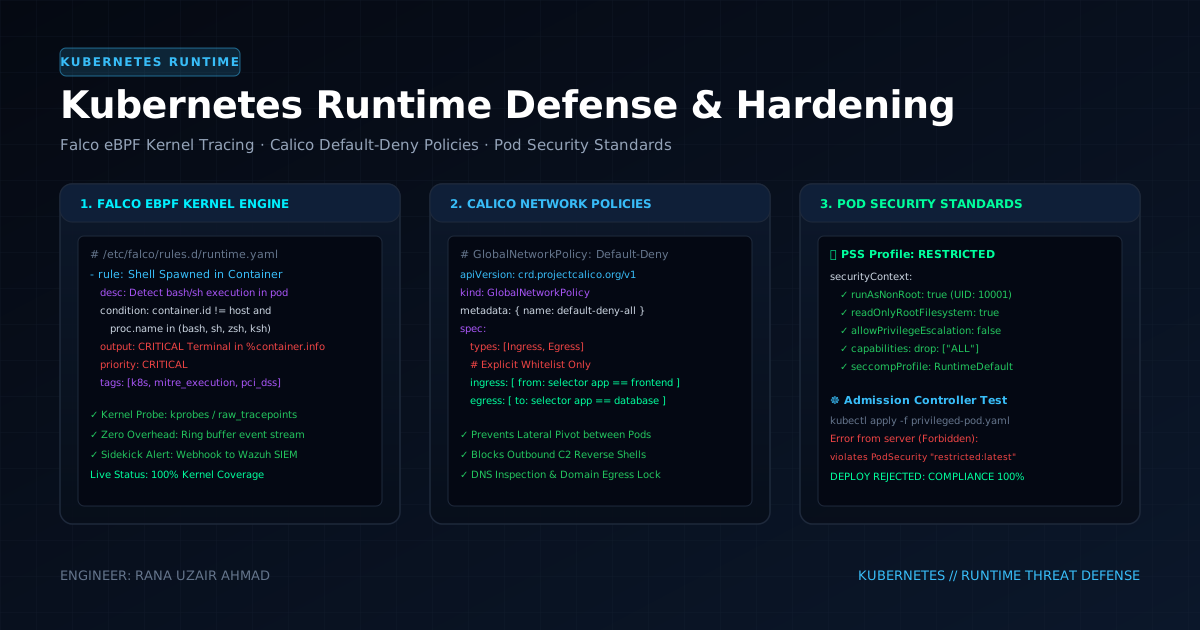
Kubernetes simplifies container orchestration at massive scale, but default clusters prioritize developer convenience over security. Permissive Linux capabilities (CAP_SYS_ADMIN), unsegmented pod-to-pod flat networks, writable root filesystems, and unauthenticated kubelet ports expose clusters to catastrophic container escapes and lateral infrastructure compromise.
This guide details how to harden production Kubernetes clusters from the Linux kernel layer up to the API Server.
1. Kubernetes Attack Surface & Defensive Matrix
+-------------------------------------------------------------------------+
|                  KUBERNETES LAYERED DEFENSE IN DEPTH                    |
+-------------------------------------------------------------------------+
|                                                                         |
|  [LAYER 1: API SERVER]   --> Strict RBAC, Disable Anonymous, Audit Log  |
|  [LAYER 2: ADMISSION]    --> Kyverno / OPA Gatekeeper Validating Webhooks|
|  [LAYER 3: POD RUNTIME]  --> Pod Security Standards (Restricted Profile)|
|  [LAYER 4: NETWORK]      --> Calico Default-Deny Ingress/Egress Policies|
|  [LAYER 5: KERNEL/eBPF]  --> Falco Real-Time Syscall Behavioral Alerts  |
|                                                                         |
+-------------------------------------------------------------------------+
2. Pod Security Standards: Enforcing the Restricted Baseline
Pod Security Admission (PSA) enforces built-in security profiles at the namespace level: Privileged, Baseline, and Restricted.
Namespace-Level Enforcement (namespace.yaml):
apiVersion: v1
kind: Namespace
metadata:
  name: production-workloads
  labels:
    pod-security.kubernetes.io/enforce: restricted
    pod-security.kubernetes.io/enforce-version: latest
    pod-security.kubernetes.io/warn: restricted
    pod-security.kubernetes.io/audit: restricted
Production-Hardened Pod Specification (deployment.yaml):
apiVersion: apps/v1
kind: Deployment
metadata:
  name: hardened-api-service
  namespace: production-workloads
spec:
  replicas: 3
  selector:
    matchLabels:
      app: api-service
  template:
    metadata:
      labels:
        app: api-service
    spec:
      # Isolate Service Account Token
      automountServiceAccountToken: false
      securityContext:
        runAsNonRoot: true
        runAsUser: 10001
        runAsGroup: 10001
        fsGroup: 10001
        seccompProfile:
          type: RuntimeDefault
      containers:
        - name: app
          image: ghcr.io/dynamo2k1/api-service:v2.4.0@sha256:7f83b1c9...
          imagePullPolicy: IfNotPresent
          securityContext:
            allowPrivilegeEscalation: false
            readOnlyRootFilesystem: true
            capabilities:
              drop:
                - ALL
          resources:
            limits:
              cpu: "500m"
              memory: "512Mi"
            requests:
              cpu: "100m"
              memory: "128Mi"
          volumeMounts:
            - name: tmp-storage
              mountPath: /tmp
      volumes:
        - name: tmp-storage
          emptyDir:
            medium: Memory
            sizeLimit: "64Mi"
3. Calico Zero-Trust NetworkPolicies: Default-Deny Architecture
By default, any pod in a Kubernetes cluster can communicate with any other pod across all namespaces. Implement an explicit Default-Deny All Ingress and Egress policy:
# 1. Global Default-Deny for Namespace
apiVersion: networking.k8s.io/v1
kind: NetworkPolicy
metadata:
  name: default-deny-all
  namespace: production-workloads
spec:
  podSelector: {}
  policyTypes:
    - Ingress
    - Egress
---
# 2. Explicit Ingress/Egress Whitelist for API Service
apiVersion: networking.k8s.io/v1
kind: NetworkPolicy
metadata:
  name: allow-api-service-traffic
  namespace: production-workloads
spec:
  podSelector:
    matchLabels:
      app: api-service
  policyTypes:
    - Ingress
    - Egress
  ingress:
    # Allow traffic ONLY from Ingress Controller on Port 8080
    - from:
        - namespaceSelector:
            matchLabels:
              kubernetes.io/metadata.name: ingress-nginx
      ports:
        - protocol: TCP
          port: 8080
  egress:
    # Allow DNS queries to CoreDNS
    - to:
        - namespaceSelector:
            matchLabels:
              kubernetes.io/metadata.name: kube-system
          podSelector:
            matchLabels:
              k8s-app: kube-dns
      ports:
        - protocol: UDP
          port: 53
    # Allow egress ONLY to Internal PostgreSQL Database
    - to:
        - podSelector:
            matchLabels:
              app: postgres-db
      ports:
        - protocol: TCP
          port: 5432
4. Real-Time Runtime Threat Detection with Falco (eBPF)
Falco taps into Linux kernel system calls via eBPF probes to detect anomalous container activities in real time (e.g. interactive shell spawns, sensitive /etc writes, unexpected outbound network connections).
Custom Falco Threat Detection Rule (falco_rules.local.yaml):
- rule: Terminal Shell Spawned in Production Container
  desc: Detect interactive shell execution inside a live container (Mitre T1059)
  condition: >
    container.id != host and
    spawned_process and
    proc.name in (bash, sh, zsh, ksh, ash) and
    container.image.repository not in (troubleshooting-debug-tools)
  output: >
    ALERT: Shell spawned inside container (user=%user.name user_loginuid=%user.loginuid
    process=%proc.name parent=%proc.pname cmdline=%proc.cmdline
    container_id=%container.id container_name=%container.name image=%container.image.repository)
  priority: CRITICAL
  tags: [container, mitre_execution, pci_dss_10.2]

- rule: Sensitive File Written Inside Container
  desc: Detect tampering with critical system binaries or configs
  condition: >
    open_write and
    container.id != host and
    fd.name startswith /etc/ or fd.name startswith /bin/ or fd.name startswith /usr/bin/
  output: >
    ALERT: Critical path write attempt inside container (file=%fd.name process=%proc.name
    container=%container.name user=%user.name)
  priority: HIGH
  tags: [container, filesystem, defense_evasion]
5. Kubernetes Hardening Verification Checklist
# 1. Audit RBAC Permissions for Privilege Escalation Vectors
kubectl auth can-i create pods --as system:serviceaccount:default:my-sa -n production-workloads

# 2. Run Automated CIS Kubernetes Benchmark
kube-bench run --targets master,node,etcd,policies

# 3. Test Network Policy Isolation (Must Timeout)
kubectl exec -it test-pod -n production-workloads -- nc -zv 10.0.100.50 80
// Discussion