Docker & Kubernetes Security - Container Hardening
Advanced guide to securing Docker containers and Kubernetes clusters, covering image scanning, RBAC, runtime security, and incident response.
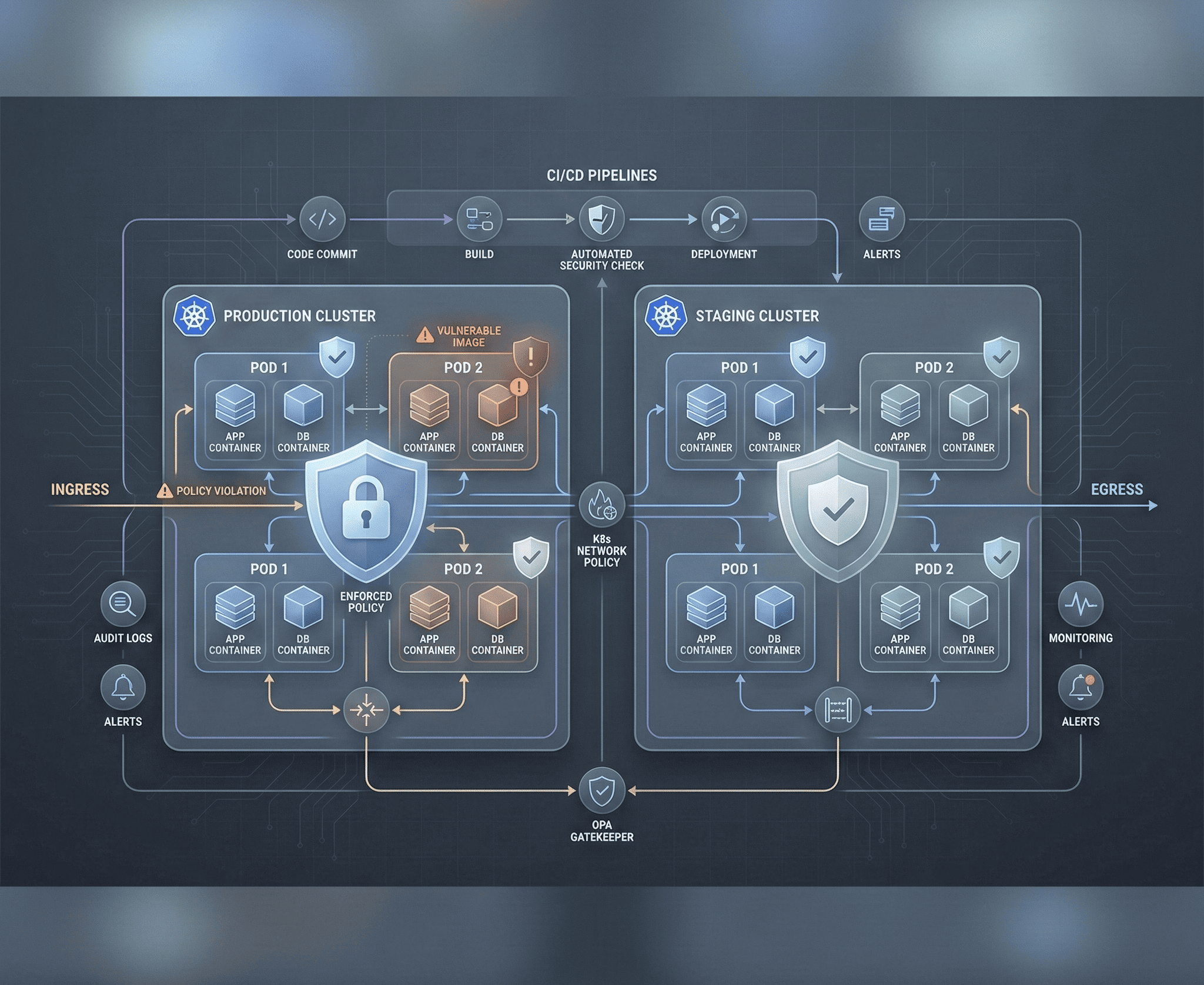
Containers have fundamentally changed how we build and deploy software, but they have also introduced an entirely new attack surface. A misconfigured Docker container or an overly permissive Kubernetes cluster can give an attacker a direct path from a web application vulnerability to full infrastructure compromise. This guide covers the security landscape across the entire container lifecycle — from building images to runtime defense and incident response.
Docker Security Fundamentals
Image Security
Your container is only as secure as the image it runs. Every layer in a Docker image can introduce vulnerabilities, malware, or unnecessary attack surface.
Use minimal base images to reduce the number of packages an attacker can exploit:
# Bad - full Ubuntu with hundreds of packages
FROM ubuntu:22.04

# Better - slim variant with fewer packages
FROM python:3.12-slim

# Best - distroless with only your application binary
FROM gcr.io/distroless/python3-debian12

# Best for compiled languages - scratch (empty filesystem)
FROM scratch
COPY --from=builder /app/binary /binary
ENTRYPOINT ["/binary"]
Dockerfile Best Practices
A secure Dockerfile follows several critical patterns:
# Pin image digests instead of mutable tags
FROM python:3.12-slim@sha256:abc123def456...

# Create a non-root user
RUN groupadd -r appuser && useradd -r -g appuser -d /app -s /sbin/nologin appuser

# Copy dependency files first for layer caching
COPY requirements.txt /app/
RUN pip install --no-cache-dir -r /app/requirements.txt

# Copy application code
COPY --chown=appuser:appuser . /app/
WORKDIR /app

# Drop all capabilities and run as non-root
USER appuser

# Use COPY instead of ADD (ADD can fetch remote URLs and extract archives)
# Never use: ADD https://example.com/file.tar.gz /app/

# Set read-only filesystem where possible
# Health check for orchestrator integration
HEALTHCHECK --interval=30s --timeout=3s --retries=3 \
  CMD curl -f http://localhost:8080/health || exit 1

EXPOSE 8080
ENTRYPOINT ["python", "app.py"]
Secret Management in Docker
Never bake secrets into images. They persist in image layers and can be extracted even if deleted in a later layer:
# WRONG - secret visible in image history
RUN echo "DB_PASSWORD=secret123" > /app/.env

# WRONG - secret in build args (visible in image metadata)
ARG DB_PASSWORD
RUN echo $DB_PASSWORD > /app/.env

# CORRECT - use Docker secrets (Swarm) or mount at runtime
docker run -e DB_PASSWORD_FILE=/run/secrets/db_password \
  -v /path/to/secret:/run/secrets/db_password:ro \
  myapp:latest

# CORRECT - use BuildKit secrets for build-time secrets
# syntax=docker/dockerfile:1
RUN --mount=type=secret,id=pip_token \
  PIP_INDEX_URL="https://$(cat /run/secrets/pip_token)@pypi.example.com/simple/" \
  pip install -r requirements.txt
Docker Runtime Security
# Run containers with minimal privileges
docker run \
  --read-only \                          # Read-only root filesystem
  --tmpfs /tmp:rw,noexec,nosuid \        # Writable tmp without exec
  --cap-drop ALL \                       # Drop all Linux capabilities
  --cap-add NET_BIND_SERVICE \           # Add back only what's needed
  --security-opt no-new-privileges \     # Prevent privilege escalation
  --security-opt seccomp=default.json \  # Apply seccomp profile
  --memory 512m \                        # Limit memory
  --cpus 1.0 \                           # Limit CPU
  --pids-limit 100 \                     # Limit process count
  --network app-network \               # Use dedicated network
  -u 1000:1000 \                         # Run as non-root UID/GID
  myapp:latest

# Never run with these flags in production
# --privileged                # Gives full host access
# --pid=host                  # Shares host PID namespace
# --network=host              # Shares host network stack
# -v /:/host                  # Mounts entire host filesystem
# -v /var/run/docker.sock:/var/run/docker.sock  # Docker socket access = root on host
Image Scanning
Trivy
Trivy is the most comprehensive open-source vulnerability scanner for containers, covering OS packages, language-specific dependencies, IaC misconfigurations, and embedded secrets:
# Scan an image for vulnerabilities
trivy image myapp:latest

# Scan with severity filter
trivy image --severity CRITICAL,HIGH myapp:latest

# Scan and fail CI pipeline if critical vulnerabilities found
trivy image --exit-code 1 --severity CRITICAL myapp:latest

# Scan a Dockerfile for misconfigurations
trivy config Dockerfile

# Scan for embedded secrets
trivy image --scanners secret myapp:latest

# Generate SBOM (Software Bill of Materials)
trivy image --format spdx-json -o sbom.json myapp:latest
Integrating Scanning in CI/CD
# GitHub Actions - scan on every push
name: Container Security Scan
on: push
jobs:
  scan:
    runs-on: ubuntu-latest
    steps:
      - uses: actions/checkout@v4
      - name: Build image
        run: docker build -t myapp:${{ github.sha }} .
      - name: Trivy vulnerability scan
        uses: aquasecurity/trivy-action@master
        with:
          image-ref: myapp:${{ github.sha }}
          format: sarif
          output: trivy-results.sarif
          severity: CRITICAL,HIGH
          exit-code: 1
      - name: Upload results to GitHub Security
        uses: github/codeql-action/upload-sarif@v3
        with:
          sarif_file: trivy-results.sarif
Kubernetes Security
RBAC (Role-Based Access Control)
RBAC controls who can do what in your cluster. Follow least privilege strictly:
# Create a role that only allows reading pods in a specific namespace
apiVersion: rbac.authorization.k8s.io/v1
kind: Role
metadata:
  namespace: production
  name: pod-reader
rules:
  - apiGroups: [""]
    resources: ["pods"]
    verbs: ["get", "list", "watch"]
  - apiGroups: [""]
    resources: ["pods/log"]
    verbs: ["get"]

---
# Bind the role to a specific service account
apiVersion: rbac.authorization.k8s.io/v1
kind: RoleBinding
metadata:
  name: read-pods-binding
  namespace: production
subjects:
  - kind: ServiceAccount
    name: monitoring-sa
    namespace: production
roleRef:
  kind: Role
  name: pod-reader
  apiGroup: rbac.authorization.k8s.io
Critical RBAC rules: Never grant cluster-admin to applications. Avoid wildcard permissions (* on resources or verbs). Audit ClusterRoleBindings regularly — they apply across all namespaces. Disable the default service account token automount in pods that don’t need API access.
Network Policies
By default, all pods can communicate with all other pods. Network Policies implement microsegmentation:
# Default deny all ingress and egress in a namespace
apiVersion: networking.k8s.io/v1
kind: NetworkPolicy
metadata:
  name: default-deny-all
  namespace: production
spec:
  podSelector: {}
  policyTypes:
    - Ingress
    - Egress

---
# Allow specific traffic - web app can receive traffic and talk to database
apiVersion: networking.k8s.io/v1
kind: NetworkPolicy
metadata:
  name: web-app-policy
  namespace: production
spec:
  podSelector:
    matchLabels:
      app: web
  policyTypes:
    - Ingress
    - Egress
  ingress:
    - from:
        - namespaceSelector:
            matchLabels:
              name: ingress-nginx
      ports:
        - port: 8080
          protocol: TCP
  egress:
    - to:
        - podSelector:
            matchLabels:
              app: postgres
      ports:
        - port: 5432
          protocol: TCP
    - to:  # Allow DNS resolution
        - namespaceSelector: {}
          podSelector:
            matchLabels:
              k8s-app: kube-dns
      ports:
        - port: 53
          protocol: UDP
Pod Security Standards
Kubernetes Pod Security Standards (replacing the deprecated PodSecurityPolicy) define three profiles:
# Enforce restricted profile at namespace level
apiVersion: v1
kind: Namespace
metadata:
  name: production
  labels:
    pod-security.kubernetes.io/enforce: restricted
    pod-security.kubernetes.io/audit: restricted
    pod-security.kubernetes.io/warn: restricted

---
# A pod that complies with the restricted profile
apiVersion: v1
kind: Pod
metadata:
  name: secure-app
  namespace: production
spec:
  securityContext:
    runAsNonRoot: true
    runAsUser: 1000
    runAsGroup: 1000
    fsGroup: 1000
    seccompProfile:
      type: RuntimeDefault
  containers:
    - name: app
      image: myapp:latest@sha256:abc123...
      securityContext:
        allowPrivilegeEscalation: false
        readOnlyRootFilesystem: true
        capabilities:
          drop: ["ALL"]
      resources:
        limits:
          memory: "256Mi"
          cpu: "500m"
        requests:
          memory: "128Mi"
          cpu: "250m"
      volumeMounts:
        - name: tmp
          mountPath: /tmp
  volumes:
    - name: tmp
      emptyDir:
        sizeLimit: 100Mi
  automountServiceAccountToken: false
Runtime Security with Falco
Falco monitors kernel system calls in real time and alerts on suspicious container behavior:
# Custom Falco rules for container security
- rule: Terminal shell in container
  desc: Detect interactive shell sessions in containers
  condition: >
    spawned_process and container and
    proc.name in (bash, sh, zsh, dash) and
    proc.tty != 0
  output: >
    Shell opened in container
    (user=%user.name container=%container.name
    image=%container.image.repository
    shell=%proc.name parent=%proc.pname)
  priority: WARNING

- rule: Sensitive file access in container
  desc: Detect access to sensitive files
  condition: >
    open_read and container and
    fd.name in (/etc/shadow, /etc/passwd, /proc/self/environ)
  output: >
    Sensitive file read in container
    (file=%fd.name user=%user.name
    container=%container.name
    image=%container.image.repository)
  priority: CRITICAL

- rule: Unexpected outbound connection
  desc: Detect containers making unexpected external connections
  condition: >
    outbound and container and
    not (fd.sport in (80, 443, 53, 8080)) and
    not k8s.ns.name = "kube-system"
  output: >
    Unexpected outbound connection from container
    (command=%proc.cmdline connection=%fd.name
    container=%container.name
    image=%container.image.repository)
  priority: WARNING
Common Container Vulnerabilities
Privileged Container Escape
A privileged container has full access to the host kernel and devices. Escaping is trivial:
# Inside a privileged container - mount host filesystem
mkdir /mnt/host
mount /dev/sda1 /mnt/host
chroot /mnt/host

# Or use nsenter to access host namespaces
nsenter --target 1 --mount --uts --ipc --net --pid -- /bin/bashMitigation: Never run privileged containers. Use specific capabilities instead of --privileged.
Host Path Mount Exploitation
Mounting sensitive host paths into containers creates escape vectors:
# DANGEROUS - mounting Docker socket gives root access to the host
volumes:
  - /var/run/docker.sock:/var/run/docker.sock

# DANGEROUS - mounting host root filesystem
volumes:
  - /:/host

# If Docker socket is mounted, escape is trivial:
# docker run -v /:/host --privileged alpine chroot /hostMitigation: Audit all hostPath mounts. Never mount the Docker socket, /, /etc, /proc, or /sys into application containers.
Container Escape via Kernel Exploits
Containers share the host kernel. A kernel vulnerability (like CVE-2022-0185 or CVE-2022-0847 “Dirty Pipe”) can be exploited from within a container to escape to the host. Keep host kernels patched and use seccomp profiles to limit available syscalls.
Secure CI/CD for Containers
# Complete secure container pipeline
stages:
  - lint:
      # Scan Dockerfile for misconfigurations
      - hadolint Dockerfile
      - trivy config Dockerfile

  - build:
      # Build with BuildKit for security features
      - DOCKER_BUILDKIT=1 docker build --no-cache -t myapp:${CI_SHA} .

  - scan:
      # Vulnerability scanning
      - trivy image --exit-code 1 --severity CRITICAL myapp:${CI_SHA}
      # Secret scanning
      - trivy image --scanners secret myapp:${CI_SHA}
      # SBOM generation
      - trivy image --format spdx-json -o sbom.json myapp:${CI_SHA}

  - sign:
      # Sign image with cosign for supply chain integrity
      - cosign sign --key cosign.key myregistry.com/myapp:${CI_SHA}

  - deploy:
      # Verify signature before deployment
      - cosign verify --key cosign.pub myregistry.com/myapp:${CI_SHA}
      # Deploy with image digest (immutable reference)
      - kubectl set image deployment/myapp app=myregistry.com/myapp@sha256:${DIGEST}
Container Forensics
When a container incident occurs, you need to preserve evidence before the container is destroyed:
# Export the container filesystem for analysis
docker export compromised_container > container_fs.tar

# Capture container metadata
docker inspect compromised_container > container_inspect.json

# View container logs
docker logs --timestamps compromised_container > container_logs.txt

# Check for modified files compared to the image
docker diff compromised_container

# Capture network connections
docker exec compromised_container netstat -tlnp

# In Kubernetes - capture pod details before deletion
kubectl get pod compromised-pod -o yaml > pod_manifest.yaml
kubectl logs compromised-pod --all-containers > pod_logs.txt
kubectl describe pod compromised-pod > pod_describe.txt

# Copy files from the container for analysis
kubectl cp production/compromised-pod:/tmp/suspicious_file ./evidence/
Security Assessment Tools
kube-bench
kube-bench checks your Kubernetes cluster against the CIS Kubernetes Benchmark:
# Run kube-bench as a Job in your cluster
kubectl apply -f https://raw.githubusercontent.com/aquasecurity/kube-bench/main/job.yaml

# View results
kubectl logs $(kubectl get pods -l app=kube-bench -o name)

# Run specific checks
kube-bench run --targets master,node,policies
kube-hunter
kube-hunter performs penetration testing against your cluster to find exploitable vulnerabilities:
# Run kube-hunter from outside the cluster
kube-hunter --remote <cluster-ip>

# Run from inside the cluster as a pod
kubectl apply -f https://raw.githubusercontent.com/aquasecurity/kube-hunter/main/job.yaml

# Active hunting mode (attempts exploitation)
kube-hunter --remote <cluster-ip> --active
Additional Tools
| Tool | Purpose |
|---|---|
| kubeaudit | Audits cluster configurations against security best practices |
| Polaris | Validates Kubernetes resource configurations |
| OPA/Gatekeeper | Policy enforcement engine for admission control |
| Cosign | Container image signing and verification |
| Grype | Vulnerability scanner for container images and filesystems |
| Syft | SBOM generator for container images |
Container security is a continuous process that spans the entire lifecycle from development through production. Build secure images, scan them before deployment, enforce strict runtime policies, monitor for anomalies, and practice your incident response procedures. The container ecosystem moves fast — your security practices must keep pace.