Cloud Security - Securing AWS, Azure, and GCP
Comprehensive guide to cloud security best practices across AWS, Azure, and GCP, covering IAM, misconfigurations, and multi-cloud security strategies.
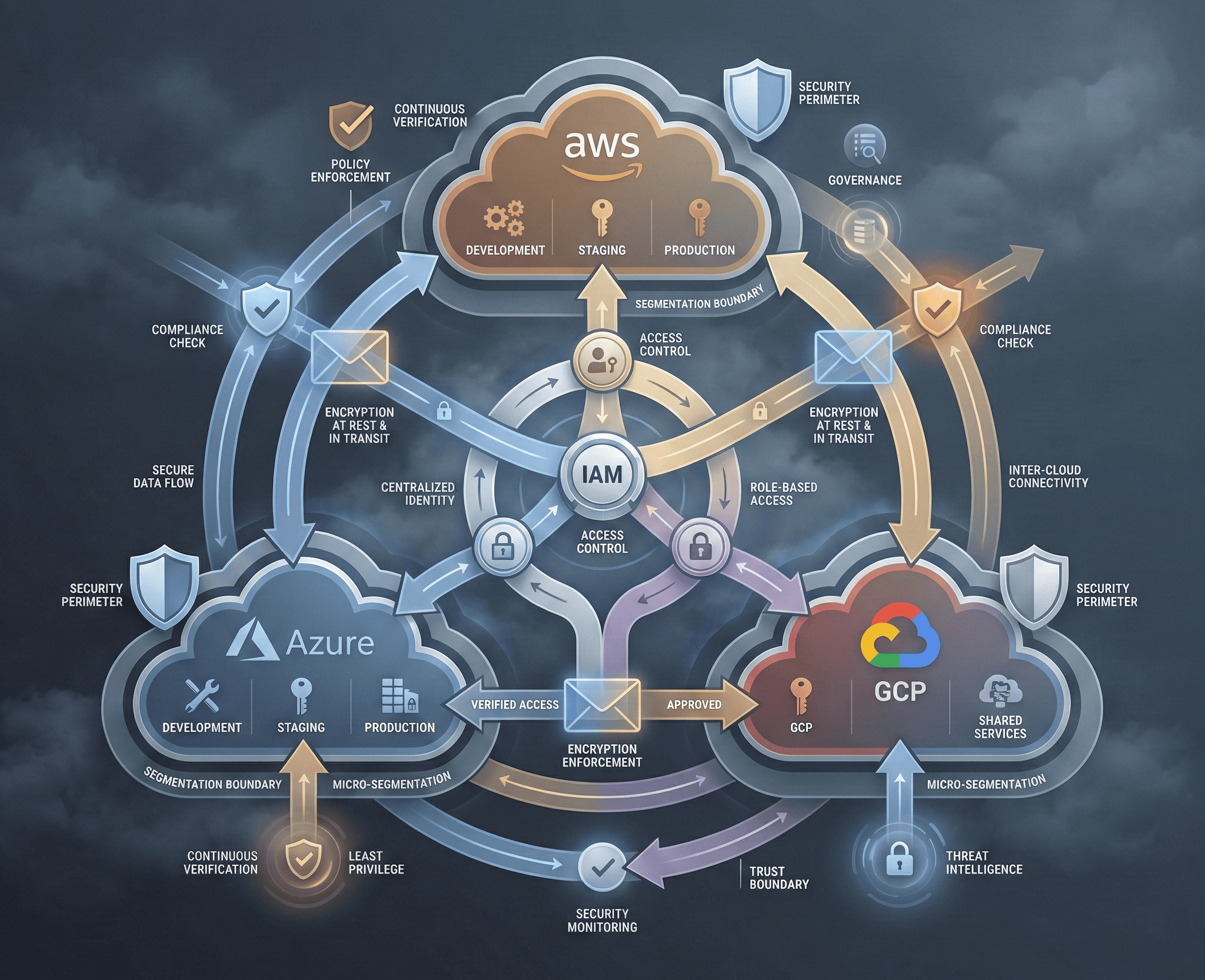
Cloud infrastructure powers the majority of modern applications, but misconfigurations remain the leading cause of cloud breaches. Whether you’re working with AWS, Azure, or GCP, understanding the shared responsibility model and platform-specific security controls is essential for protecting your organization’s assets. This guide walks through the critical security mechanisms across all three major cloud providers and provides actionable strategies for hardening your cloud environment.
The Shared Responsibility Model
Every cloud provider operates under a shared responsibility model. The provider secures the infrastructure — physical data centers, hypervisors, and the network fabric — while the customer is responsible for securing everything they deploy on top of it: data, identity, application configurations, and network controls.
The exact boundary shifts depending on the service model:
- IaaS (EC2, Azure VMs, Compute Engine): You manage the OS, middleware, and applications.
- PaaS (Elastic Beanstalk, App Service, App Engine): The provider handles the OS and runtime; you secure the application and data.
- SaaS (S3, Blob Storage, Cloud Storage): You control access policies and data classification.
Misunderstanding this boundary is the root cause of most cloud breaches. The provider will never configure your S3 bucket policies or IAM roles for you — that’s entirely your responsibility.
AWS Security Essentials
Identity and Access Management (IAM)
AWS IAM is the gatekeeper to your entire cloud environment. Follow the principle of least privilege religiously:
{
  "Version": "2012-10-17",
  "Statement": [
    {
      "Effect": "Allow",
      "Action": [
        "s3:GetObject",
        "s3:ListBucket"
      ],
      "Resource": [
        "arn:aws:s3:::production-data",
        "arn:aws:s3:::production-data/*"
      ],
      "Condition": {
        "IpAddress": {
          "aws:SourceIp": "10.0.0.0/8"
        }
      }
    }
  ]
}
Key IAM hardening practices include enforcing MFA on all human users, using IAM roles instead of long-lived access keys, implementing permission boundaries to cap the maximum privileges a role can ever assume, and regularly auditing unused permissions with IAM Access Analyzer.
S3 Bucket Security
S3 misconfigurations have caused some of the most high-profile data breaches. Lock down your buckets:
# Block all public access at the account level
aws s3control put-public-access-block \
  --account-id 123456789012 \
  --public-access-block-configuration \
    BlockPublicAcls=true,\
    IgnorePublicAcls=true,\
    BlockPublicPolicy=true,\
    RestrictPublicBuckets=true

# Enable default encryption
aws s3api put-bucket-encryption \
  --bucket production-data \
  --server-side-encryption-configuration '{
    "Rules": [{"ApplyServerSideEncryptionByDefault": {"SSEAlgorithm": "aws:kms","KMSMasterKeyID": "alias/s3-encryption-key"}}]
  }'

# Enable versioning for recovery
aws s3api put-bucket-versioning \
  --bucket production-data \
  --versioning-configuration Status=Enabled
CloudTrail and GuardDuty
CloudTrail records every API call made in your account and is essential for forensics and compliance. Enable it across all regions and send logs to a centralized, immutable S3 bucket. GuardDuty uses machine learning to detect anomalous activity — reconnaissance, compromised credentials, and cryptocurrency mining on your instances. Enable it in every region and integrate alerts with your SIEM.
# Enable CloudTrail across all regions
aws cloudtrail create-trail \
  --name organization-trail \
  --s3-bucket-name centralized-audit-logs \
  --is-multi-region-trail \
  --enable-log-file-validation

# Enable GuardDuty
aws guardduty create-detector --enable
Azure Security Essentials
Azure Active Directory (Entra ID)
Azure AD is the identity backbone for Azure and Microsoft 365. Enforce Conditional Access Policies that require MFA based on risk signals, block legacy authentication protocols that bypass MFA, and implement Privileged Identity Management (PIM) for just-in-time elevation of admin roles.
Azure Key Vault
Never store secrets in application code or configuration files. Azure Key Vault provides centralized secret management with hardware security module (HSM) backing:
# Create a Key Vault with soft delete and purge protection
az keyvault create \
  --name prod-secrets-vault \
  --resource-group production-rg \
  --location eastus \
  --enable-soft-delete true \
  --enable-purge-protection true

# Store a secret
az keyvault secret set \
  --vault-name prod-secrets-vault \
  --name "DatabaseConnectionString" \
  --value "Server=prod-db;Database=app;..."

# Grant access via RBAC (preferred over access policies)
az role assignment create \
  --role "Key Vault Secrets User" \
  --assignee <app-identity-object-id> \
  --scope /subscriptions/<sub>/resourceGroups/production-rg/providers/Microsoft.KeyVault/vaults/prod-secrets-vault
Microsoft Defender for Cloud
Defender for Cloud provides continuous security posture assessment, regulatory compliance dashboards, and threat protection across Azure, AWS, and GCP workloads. Enable the enhanced security plans for virtual machines, databases, and containers to get vulnerability scanning and runtime threat detection.
GCP Security Essentials
IAM and Organization Policies
GCP IAM uses a resource hierarchy — Organization → Folder → Project → Resource — where policies are inherited downward. Use organization policy constraints to enforce security guardrails:
# Restrict VM external IPs at the organization level
constraint: constraints/compute.vmExternalIpAccess
listPolicy:
  allValues: DENY

# Require uniform bucket-level access
constraint: constraints/storage.uniformBucketLevelAccess
booleanPolicy:
  enforced: true
VPC and Network Security
GCP’s VPC Service Controls create a security perimeter around sensitive APIs, preventing data exfiltration even if credentials are compromised:
# Create an access policy
gcloud access-context-manager policies create \
  --organization=123456789 \
  --title="Production Security Policy"

# Create a service perimeter
gcloud access-context-manager perimeters create prod-perimeter \
  --title="Production Perimeter" \
  --resources="projects/12345" \
  --restricted-services="storage.googleapis.com,bigquery.googleapis.com" \
  --policy=<policy-id>
Cloud Armor
Cloud Armor provides WAF and DDoS protection at the edge. Configure preconfigured WAF rules aligned with the OWASP Top 10 and implement rate limiting to mitigate abuse.
Common Cloud Vulnerabilities
Exposed Resources
The most common cloud vulnerability is unintentionally public resources — S3 buckets, Azure Blob containers, GCS buckets, databases with open security groups, and Elasticsearch clusters without authentication. Automate scanning for these continuously.
SSRF to Cloud Metadata
Server-Side Request Forgery (SSRF) attacks against cloud-hosted applications can reach the instance metadata service to steal credentials:
# AWS metadata endpoint (IMDSv1 - vulnerable)
curl http://169.254.169.254/latest/meta-data/iam/security-credentials/role-name

# GCP metadata endpoint
curl -H "Metadata-Flavor: Google" http://169.254.169.254/computeMetadata/v1/instance/service-accounts/default/token

# Azure metadata endpoint
curl -H "Metadata: true" "http://169.254.169.254/metadata/identity/oauth2/token?api-version=2018-02-01&resource=https://management.azure.com/"Mitigation: On AWS, enforce IMDSv2 which requires a session token obtained via a PUT request, making SSRF exploitation significantly harder. On GCP and Azure, validate and sanitize all user-supplied URLs, and restrict outbound network access from application servers.
Cloud Security Assessment Tools
ScoutSuite
ScoutSuite is a multi-cloud security auditing tool that evaluates your environment against best practices:
# Install ScoutSuite
pip install scoutsuite

# Scan AWS environment
scout aws --profile production

# Scan Azure environment
scout azure --cli

# Scan GCP environment
scout gcp --user-account
ScoutSuite generates an interactive HTML report highlighting dangerous configurations across IAM, storage, compute, networking, and logging services.
Prowler
Prowler is an AWS-focused security assessment tool aligned with CIS benchmarks and PCI-DSS:
# Run Prowler with CIS benchmark checks
prowler aws -c cis_level2

# Run specific security checks
prowler aws -c check11 check12 check13

# Output results in JSON for SIEM ingestion
prowler aws -M json -o /reports/
Secure Infrastructure as Code
Misconfigurations should be caught before deployment, not after. Integrate security scanning into your IaC pipeline:
# Terraform - Secure S3 bucket example
resource "aws_s3_bucket" "secure_bucket" {
  bucket = "production-secure-data"

  versioning {
    enabled = true
  }

  server_side_encryption_configuration {
    rule {
      apply_server_side_encryption_by_default {
        sse_algorithm     = "aws:kms"
        kms_master_key_id = aws_kms_key.s3_key.arn
      }
    }
  }

  logging {
    target_bucket = aws_s3_bucket.log_bucket.id
    target_prefix = "s3-access-logs/"
  }
}

resource "aws_s3_bucket_public_access_block" "secure_bucket" {
  bucket = aws_s3_bucket.secure_bucket.id

  block_public_acls       = true
  block_public_policy     = true
  ignore_public_acls      = true
  restrict_public_buckets = true
}
Scan IaC templates with tools like Checkov, tfsec, or KICS before they reach production:
# Scan Terraform with Checkov
checkov -d /path/to/terraform/ --framework terraform

# Scan with tfsec
tfsec /path/to/terraform/
Case Study: The Capital One Breach
In 2019, a former AWS employee exploited an SSRF vulnerability in Capital One’s WAF to reach the EC2 metadata service, steal IAM role credentials, and exfiltrate over 100 million customer records from S3. The root causes included an overly permissive IAM role attached to the WAF, failure to enforce IMDSv2, and insufficient monitoring of unusual S3 access patterns.
Lessons learned: enforce IMDSv2 across all instances, follow least privilege rigorously for every IAM role, monitor for anomalous data access with tools like GuardDuty and Macie, and implement VPC endpoints to restrict S3 access to known network paths.
Building a Multi-Cloud Security Strategy
Securing a multi-cloud environment requires a unified approach. Centralize identity management with a single IdP federated to all providers. Normalize logging into a single SIEM for cross-cloud correlation. Enforce consistent policies using tools like Open Policy Agent (OPA) that work across AWS, Azure, and GCP. Implement Cloud Security Posture Management (CSPM) solutions that provide a single pane of glass across providers.
Cloud security is not a product you buy — it’s a discipline you practice continuously. Start with the fundamentals: least privilege IAM, encrypted storage, comprehensive logging, and automated compliance checking. Build from there into runtime threat detection and incident response automation.