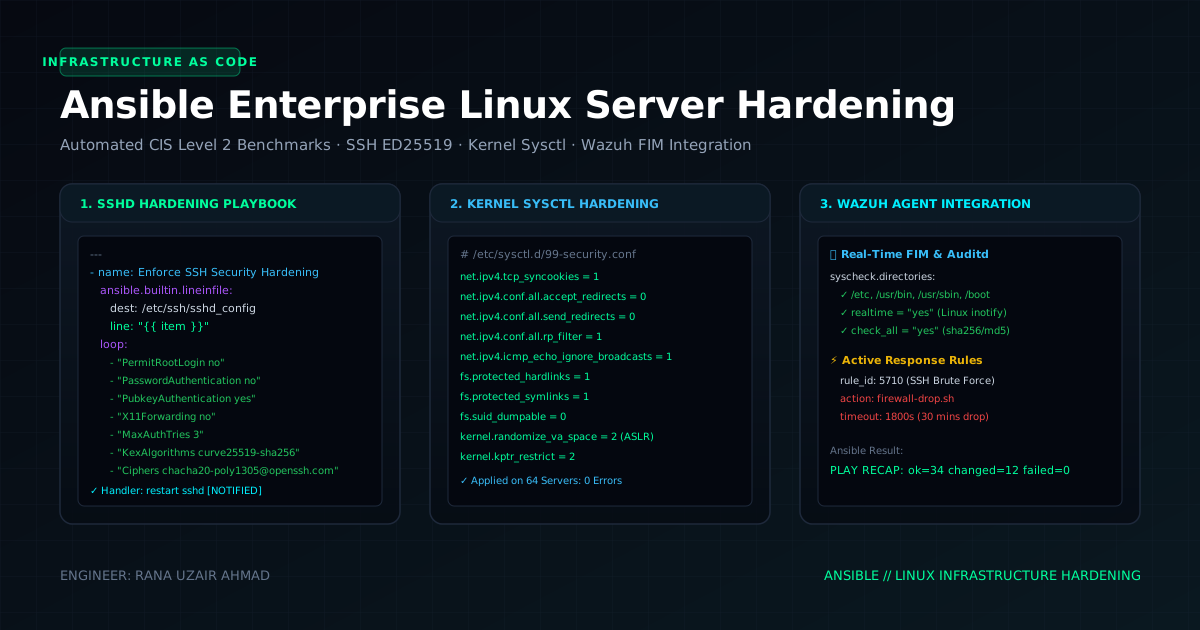
Manual server configuration leads to configuration drift, unpatched vulnerabilities, and inconsistent security postures across fleets. Infrastructure automation with Ansible provides idempotent, cryptographically verifiable, and auditable security baselining across bare-metal and cloud Linux instances.
This masterclass presents a modular Ansible playbook architecture to automate CIS Linux Benchmark enforcement, SSH daemon cryptographic lockdown, firewall policy orchestration, and automated SIEM agent deployment.
1. Modular Playbook Architecture Overview
+-------------------------------------------------------------------------+
|                  ANSIBLE SECURITY PLAYBOOK STRUCTURE                    |
+-------------------------------------------------------------------------+
|                                                                         |
|  [site.yml] (Master Orchestrator)                                       |
|       |                                                                 |
|       +--> [roles/common]       --> Kernel sysctl & auditd rules        |
|       +--> [roles/ssh_lockdown] --> Ed25519 keys, disable root/password |
|       +--> [roles/firewall]     --> UFW / iptables strict default-deny  |
|       +--> [roles/fail2ban]     --> Dynamic brute-force jails           |
|       +--> [roles/siem_agent]   --> Wazuh & CyberGuard FIM daemon       |
|                                                                         |
+-------------------------------------------------------------------------+
2. Kernel Hardening & Sysctl Security Parameters (sysctl.conf)
Harden the Linux network stack and kernel memory protections against SYN floods, IP spoofing, and unprivileged memory disclosures:
# roles/common/tasks/sysctl.yml
---
- name: Apply Hardened Linux Kernel Sysctl Parameters
  ansible.posix.sysctl:
    name: "{{ item.key }}"
    value: "{{ item.value }}"
    state: present
    reload: yes
  loop:
    # Disable IP Source Routing (Prevents Malicious Packet Redirection)
    - { key: 'net.ipv4.conf.all.accept_source_route', value: '0' }
    - { key: 'net.ipv4.conf.default.accept_source_route', value: '0' }

    # Disable ICMP Redirect Acceptance (Prevents MITM Routing Attacks)
    - { key: 'net.ipv4.conf.all.accept_redirects', value: '0' }
    - { key: 'net.ipv4.conf.default.accept_redirects', value: '0' }

    # Enable SYN Cookies (Mitigates SYN Flood DDoS Attacks)
    - { key: 'net.ipv4.tcp_syncookies', value: '1' }

    # Enable Strict Reverse Path Filtering (Mitigates IP Spoofing)
    - { key: 'net.ipv4.conf.all.rp_filter', value: '1' }
    - { key: 'net.ipv4.conf.default.rp_filter', value: '1' }

    # Restrict Access to Kernel Pointer Addresses in /proc
    - { key: 'kernel.kptr_restrict', value: '2' }

    # Restrict dmesg Access to Root Only
    - { key: 'kernel.dmesg_restrict', value: '1' }

    # Disable Unprivileged eBPF Execution
    - { key: 'kernel.unprivileged_bpf_disabled', value: '1' }
3. Cryptographic SSH Lockdown Role (sshd_config)
Eliminate password-based authentication, enforce modern cryptography (Curve25519 / Ed25519), and restrict root login:
# roles/ssh_lockdown/tasks/main.yml
---
- name: Enforce CIS-Compliant sshd_config
  ansible.builtin.template:
    src: sshd_config.j2
    dest: /etc/ssh/sshd_config
    owner: root
    group: root
    mode: '0600'
    validate: '/usr/sbin/sshd -t -f %s'
  notify: Restart SSH Service
Production Jinja2 Template (roles/ssh_lockdown/templates/sshd_config.j2):
# Production CIS-Hardened OpenSSH Server Configuration
Port 2222
Protocol 2
AddressFamily inet
ListenAddress 0.0.0.0

# Authentication Controls
PermitRootLogin no
MaxAuthTries 3
MaxSessions 4
PubkeyAuthentication yes
PasswordAuthentication no
PermitEmptyPasswords no
ChallengeResponseAuthentication no
UsePAM yes
AuthenticationMethods publickey

# Cryptographic Ciphers & Key Exchange (No Legacy SHA-1 or CBC)
KexAlgorithms curve25519-sha256,curve25519-sha256@libssh.org,diffie-hellman-group16-sha512,diffie-hellman-group18-sha512
Ciphers chacha20-poly1305@openssh.com,aes256-gcm@openssh.com,aes128-gcm@openssh.com
MACs hmac-sha2-512-etm@openssh.com,hmac-sha2-256-etm@openssh.com

# Session Management & Timeouts
ClientAliveInterval 300
ClientAliveCountMax 2
X11Forwarding no
AllowAgentForwarding no
AllowTcpForwarding no
4. Automated Fail2ban Jail Orchestration
Deploy dynamic brute-force mitigation across SSH and web server endpoints:
# roles/fail2ban/tasks/main.yml
---
- name: Install and Configure Fail2ban
  ansible.builtin.apt:
    name: fail2ban
    state: present
    update_cache: yes

- name: Deploy Jail Configuration
  ansible.builtin.copy:
    dest: /etc/fail2ban/jail.local
    owner: root
    group: root
    mode: '0644'
    content: |
      [DEFAULT]
      bantime = 1h
      findtime = 10m
      maxretry = 3
      backend = systemd

      [sshd]
      enabled = true
      port = 2222
      filter = sshd
      maxretry = 3
  notify: Restart Fail2ban
5. Orchestrated SIEM Endpoint Deployment (CyberGuard Agent / Wazuh)
Automate the compile, configuration, and daemon startup of the C-based endpoint monitoring agent:
# roles/siem_agent/tasks/main.yml
---
- name: Ensure Build Prerequisites for C SIEM Agent
  ansible.builtin.apt:
    name:
      - build-essential
      - libcurl4-openssl-dev
    state: present

- name: Sync CyberGuard Agent Source Code
  ansible.builtin.git:
    repo: 'https://github.com/Dynamo2k1/CyberGuard_agent.git'
    dest: /opt/cyberguard-agent
    version: main

- name: Compile CyberGuard Binary
  ansible.builtin.command:
    cmd: make
    chdir: /opt/cyberguard-agent
    creates: /opt/cyberguard-agent/cyberguard_daemon

- name: Deploy Systemd Unit for SIEM Agent
  ansible.builtin.copy:
    dest: /etc/systemd/system/cyberguard.service
    mode: '0644'
    content: |
      [Unit]
      Description=CyberGuard C Inotify Host Monitoring Daemon
      After=network.target

      [Service]
      Type=simple
      ExecStart=/opt/cyberguard-agent/cyberguard_daemon --watch /etc,/bin,/usr/bin --siem-ip 10.0.100.5
      Restart=always
      RestartSec=5

      [Install]
      WantedBy=multi-user.target

- name: Start and Enable CyberGuard Service
  ansible.builtin.systemd:
    name: cyberguard
    state: started
    enabled: yes
    daemon_reload: yes
6. Verification and Audit Playbook Execution
Execute the full baseline audit across all production inventory groups:
# Verify Syntax & Lint Playbook
ansible-lint site.yml

# Execute Playbook with Dry-Run Check Mode
ansible-playbook -i inventory/production.ini site.yml --check --diff

# Apply Security Baselines to Fleet
ansible-playbook -i inventory/production.ini site.yml
// Discussion